The Debug Panel That Remembered a Login
·
Xenofic.
How an exposed Laravel debug panel on a bank's site quietly recorded an admin login, and a clean disclosure to CERT-In.
I thought the .bank.in story was already old news.
Then a bank's website handed me its debug panel, and the debug panel handed me a login it had quietly written down hours earlier.
This is the story of that night. It is not a story about a clever exploit or a zero day. It is a story about six or seven boring decisions that were each survivable on their own, and became something else when you stacked them. That is usually how the interesting ones go.
Everything sensitive in the screenshots below is masked. I am not reproducing any credential, cookie, token, IP, or customer record, and I will be explicit about the difference between what I saw and what I inferred. That distinction is the whole point.
The .bank.in rabbit hole #
It was late on the night of August 18, technically the small hours of August 19. I was scrolling X and ran into a thread about someone pulling a .env file straight off a bank's production domain. An application's entire environment configuration, database credentials and app keys and all, sitting at a public URL on a bank.
That is the kind of thing that makes you put your phone down for a second.
The thread pointed at a community writeup on the .bank.in namespace itself: the history of Indian banks migrating onto the dedicated bank.in domain, and some of the security potholes on the way there, including concerns about how cookies were scoped across these domains. If you want the ecosystem background, that report is worth reading on its own.
I read it and came away with a comfortable assumption:
If all of this had already been discussed in public, surely the remaining
bank.insites had been cleaned up by now.
That assumption was wrong. It usually is.
"Surely this is fixed by now" #
The only way to actually test that assumption was to look. So I did some very light reconnaissance across the namespace, the sort of thing anyone can do from a search bar with a site: filter, and started clicking through banking sites to get a feel for the general hygiene.
Most of what I saw was fine. Reasonably modern, reasonably locked down, nothing that jumped out. That was reassuring right up until it wasn't.
Eventually I drifted toward the Regional Rural Banks, the Gramin / Gramin Vikash banks. There are a lot of them, too many to look at one by one, so I grabbed two: a Haryana based Gramin Vikas Bank, and Assam Gramin Vikash Bank.
The Haryana one actually surprised me. It looked modern, seemingly a React front end, not the profile I was expecting. I set it aside.
I went with Assam Gramin Vikash Bank instead, partly for the boring honest reason that I am from Assam and wanted to look at something close to home.
The site was agvb.bank.in. From the outside it looked like a PHP application, and pretty quickly like a Laravel one.
The first strange response #
My approach here was not sophisticated. Because it looked like Laravel, I did some basic content discovery, walking common paths to see what existed. Login pages, admin routes, the usual furniture. Nothing exciting.
Then one response came back wrong.
While requests were flying, one of them returned an error page carrying the unmistakable furniture of a Laravel debug interface instead of a normal 404. I stopped the noise and went back by hand.
Here is the detail that mattered: some invalid routes returned a plain client side 404, while others returned a Laravel error page with a debug toolbar attached. The exact path I typed (/php, as it happens) was not important. What was important was that the application had a code path where it would happily render its internal debug tooling to an anonymous visitor on the public internet.
That was clue number one.
At first, it didn't look that bad #
When I opened the panel properly, this is roughly what I saw.
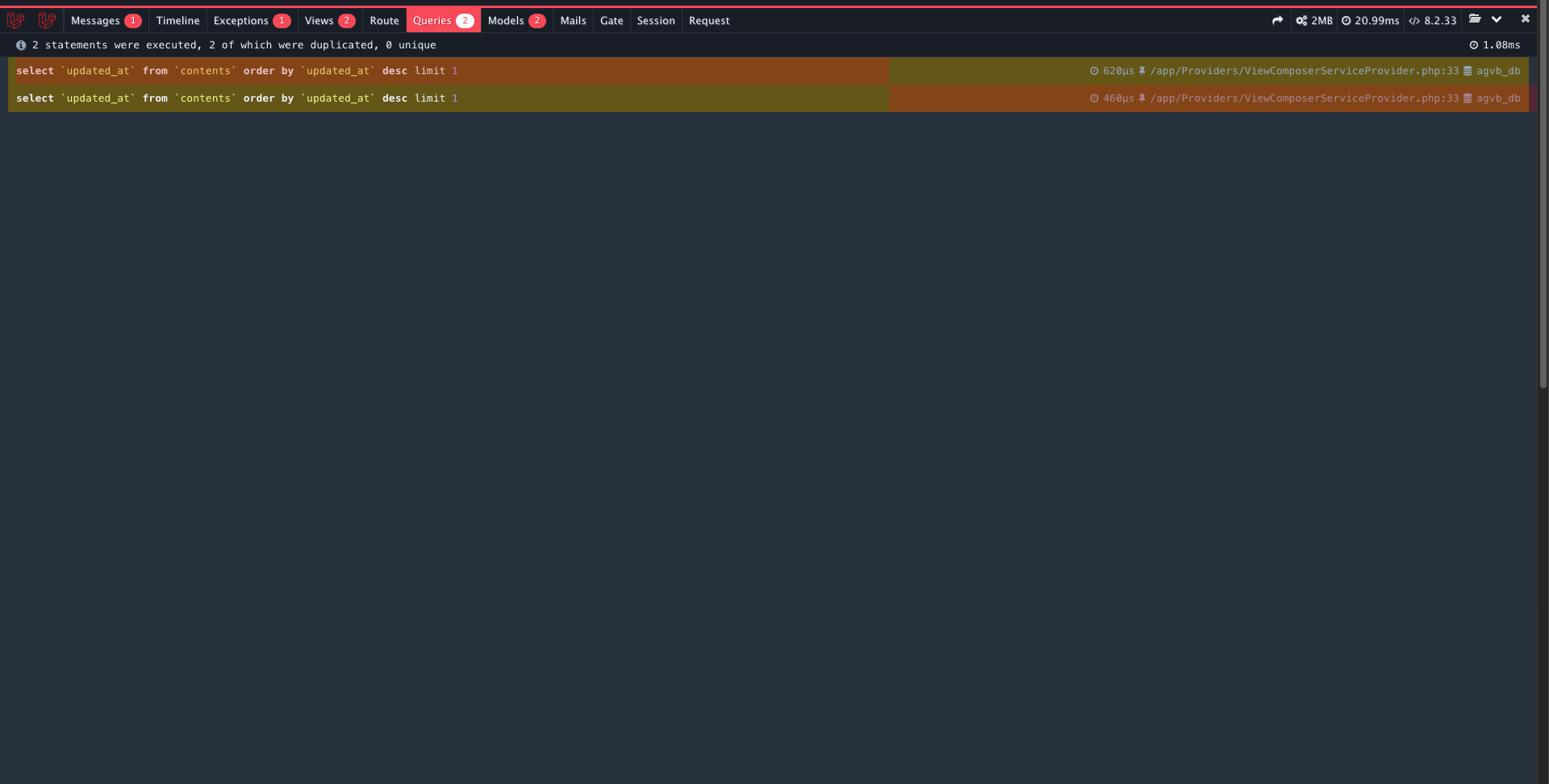
Figure 1. The debug panel, Queries tab. Notice the specifics: this is Laravel Debugbar (the tab strip of Messages / Timeline / Exceptions / Views / Route / Queries / Models / Mails / Gate / Session / Request is its signature). It is showing the SQL the page ran (select \updated_at` from `contents`...), the source file that fired it (/app/Providers/ViewComposerServiceProvider.php), query timings, PHP 8.2.33, and the database name agvb_db. Two things worth flagging early: I could **read** these queries, I could not **run** them, and the /app/...` path is the first hint that this is a containerised deployment, not a raw host.
At this point my honest read was: bad, but bounded. A debug panel that reflects your own request back at you is a real information disclosure problem. It leaks your headers, your cookies, the app's internal file paths, the SQL it generated, framework versions. That is genuinely useful to an attacker and it should never be public. But on its own it is a leak, not a compromise.
So the question I actually asked myself was the useful one: how far does this go?
A quick word on what "this" is, because terminology matters here and I want this to survive a read from people who do this for a living. Laravel Debugbar is a development aid. Its own project documentation is blunt that it should not be run on a public or production site, and Laravel's own deployment guidance says the app's debug mode should be off in production, precisely because debug output exposes sensitive internals. Laravel itself was not "hacked." This is a deployment and configuration problem: a development tool left switched on where the public could reach it. I want to be careful not to claim I established APP_DEBUG=true specifically, because Debugbar can be toggled on through its own switch independent of that flag. What I can say for certain is that the debug tooling was live in production.
The administrative route #
The application had an admin area. Poking at routes conceptually like /admin/admin or /admin/admin/grievance did the correct thing: it bounced me to a login page. Good. That is access control working.
But the entry point itself, the admin.php front controller, behaved differently. And that is where the story turns.
On the admin side, the debug panel was not just reflecting my own request. It exposed a feature I had glanced at earlier and underestimated: a button labelled Open.
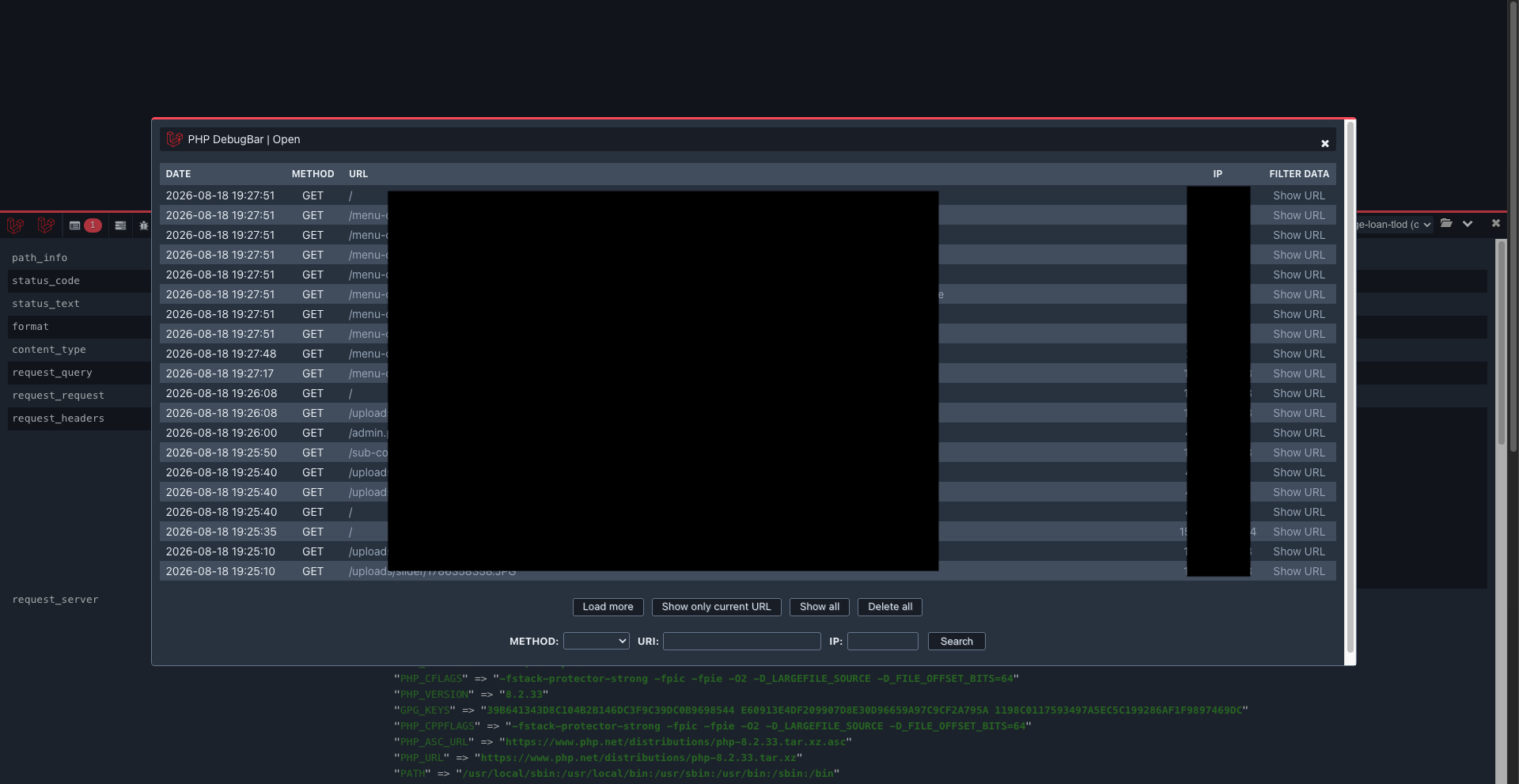
Figure 2. This is the moment the scope changed. The window is titled, in the app's own words, "PHP DebugBar | Open." This is Debugbar's storage browser. When Debugbar is configured to persist its data, it writes a record of every request it handles to disk, and this handler lets you page back through them. Notice the columns: date, method, URL, and IP, for a long list of requests, going back across timestamps that were not mine.
This is the single most important correction I want to make to how a story like this usually gets told. I did not "intercept traffic." I was not sitting between anyone and the bank. Nothing was sniffed off the wire. The application had been recording its own requests into the debug tool's storage, and the debug tool was handing me the archive. Same end result in terms of exposure, completely different mechanism, and the mechanism is the part other people can learn from.
The request logger #
So now I could browse stored requests, not just my own. The obvious next question: what does one of these stored records actually contain?
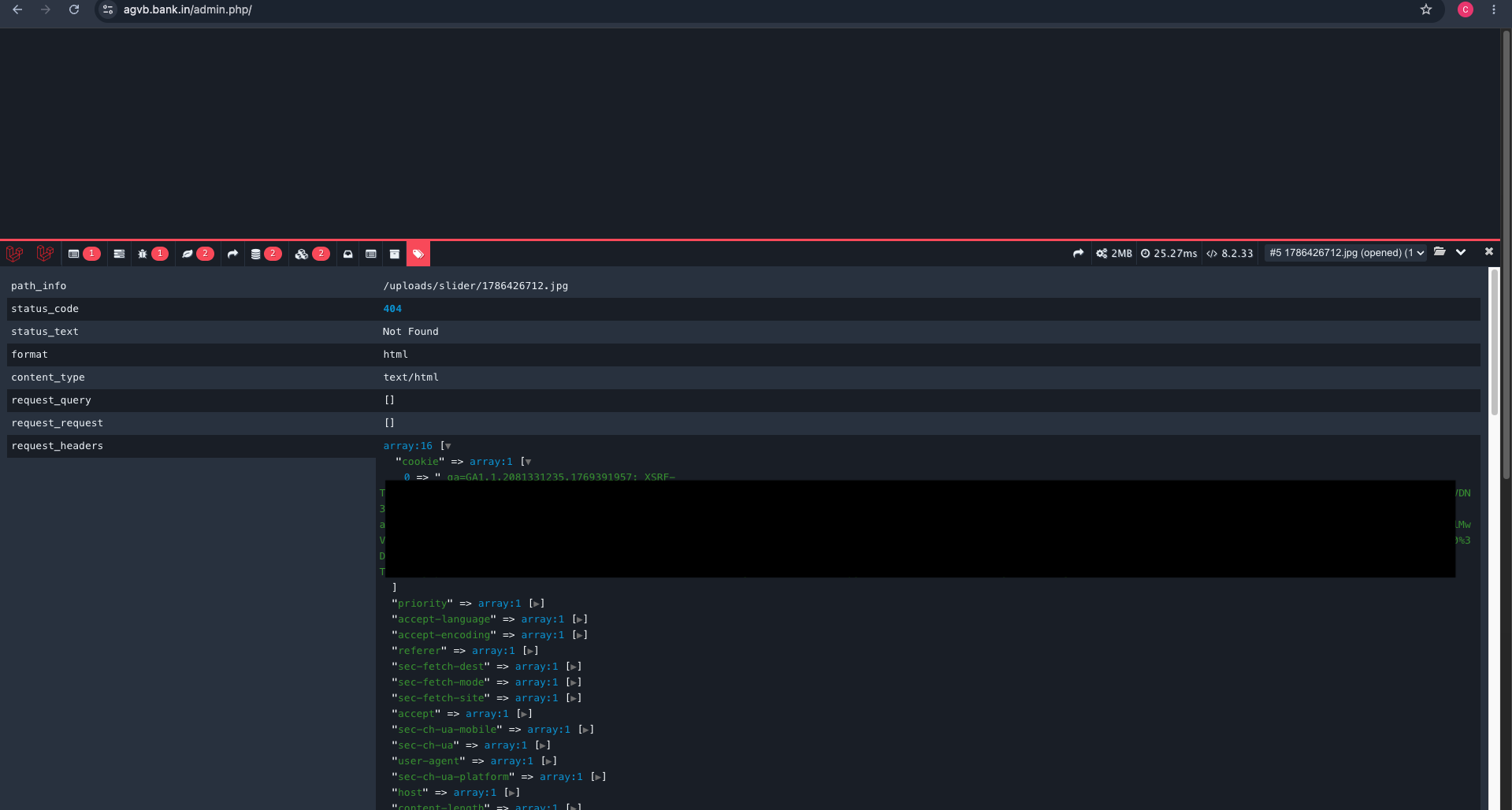
Figure 3. One stored request, expanded. This particular one is harmless in isolation, a 404 for an image under /uploads/slider/. That is the point of showing it. Look at what a "harmless" stored record still carries: the complete request_headers, including the Cookie header. You can see a Google Analytics _ga value and an XSRF- token, and the masked black box is hiding the rest of the cookie jar. Every recorded request keeps this. Which means the storage was sitting on the session cookies of whoever's requests it recorded.
I want to be careful and precise about that last sentence, because it is exactly the kind of claim that gets overstated. Cookies belonging to real sessions were present in the stored request data. That is a fact from the screenshot. Whether those specific cookies were still valid, correctly scoped, and replayable into a live session is something I did not test and cannot assert. So file "session takeover via captured cookies" under plausible impact, not demonstrated exploit. The honest version is strong enough.
The records were also keyed to specific routes. Most of them were noise: static assets, public pages, the general hum of a live website. But if the store held every request, then it held the interesting requests too. And I already knew, from the earlier content discovery, that there was an admin login.
The /login request #
You can probably see where this is going. I could not stop seeing it either.
I started filtering the stored requests for the one route that would matter more than any other: the login endpoint. The place where a human types a username and a password and presses a button.
There was a stored POST to /login.
I want to slow down here, because this was the actual pivot of the whole night. Up to this point I had "an exposed debug panel that leaks internals," which is a report you write up, send off, and feel fine about. Opening that one record was the difference between writing that report and writing this one.
The moment everything changed #
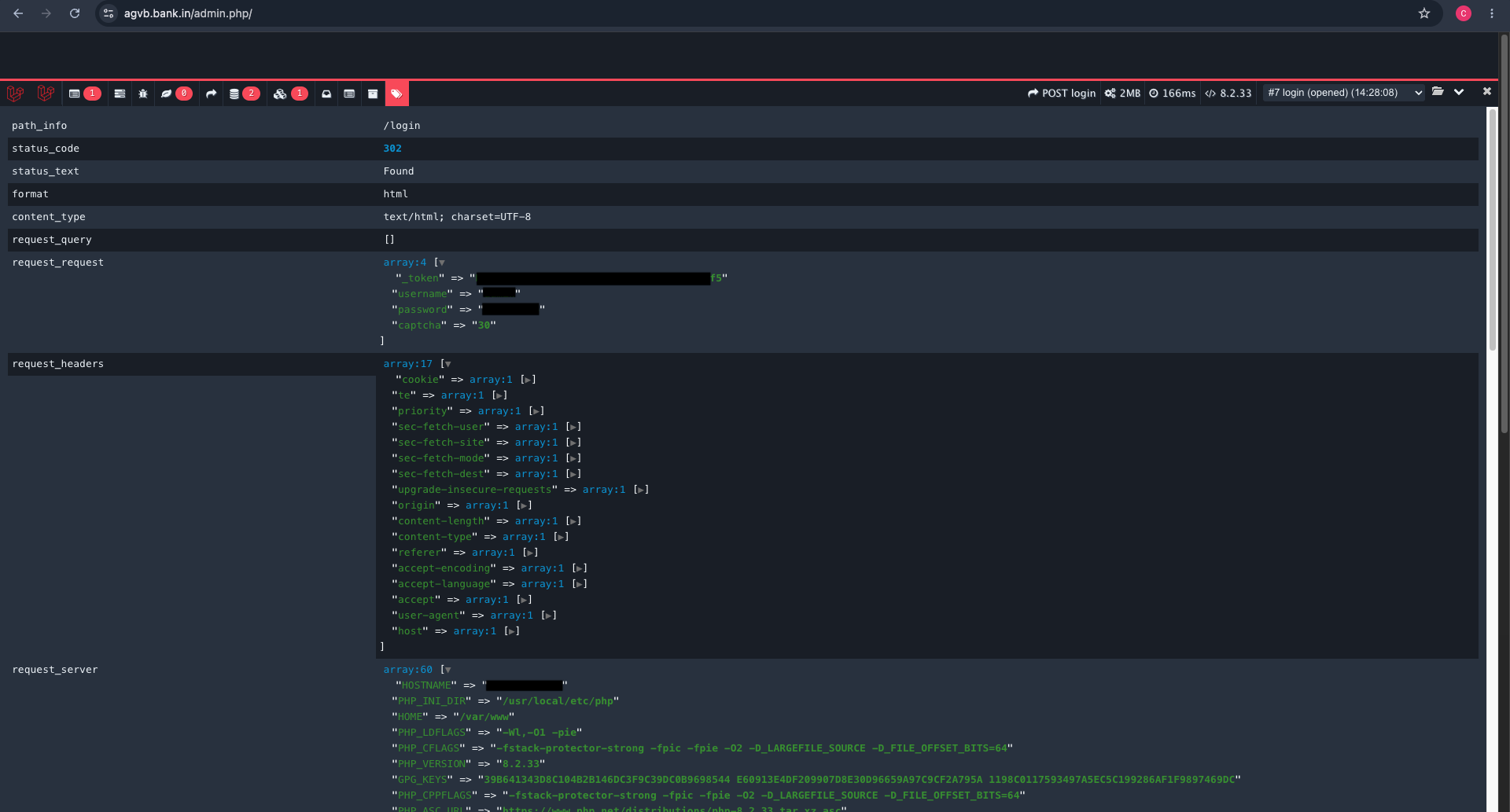
Figure 4. The stored login POST. This is the climax, so read it carefully. The request_request block is the form body Laravel parsed from the submission, and it has four fields: _token (the CSRF token), username, password, and captcha. The username and password values are masked here and I am not reproducing them, but they were sitting there in the record, in the clear. The captcha was a trivial arithmetic value. And note the status: 302 Found.
That 302 deserves a callout, because it is where the evidence actually corrected my own memory of the night. I had it in my head that the login request came back 200. It did not. It was a 302 redirect. And the 302 is the stronger fact: a failed login typically re-renders the form and returns 200, while a successful one issues a redirect to the dashboard. A stored 302 on /login is the fingerprint of a login that worked. The store had not just recorded a login attempt. It had recorded a successful one, with the password in the body.
The application's own audit trail, which I could see once inside, backs this up:
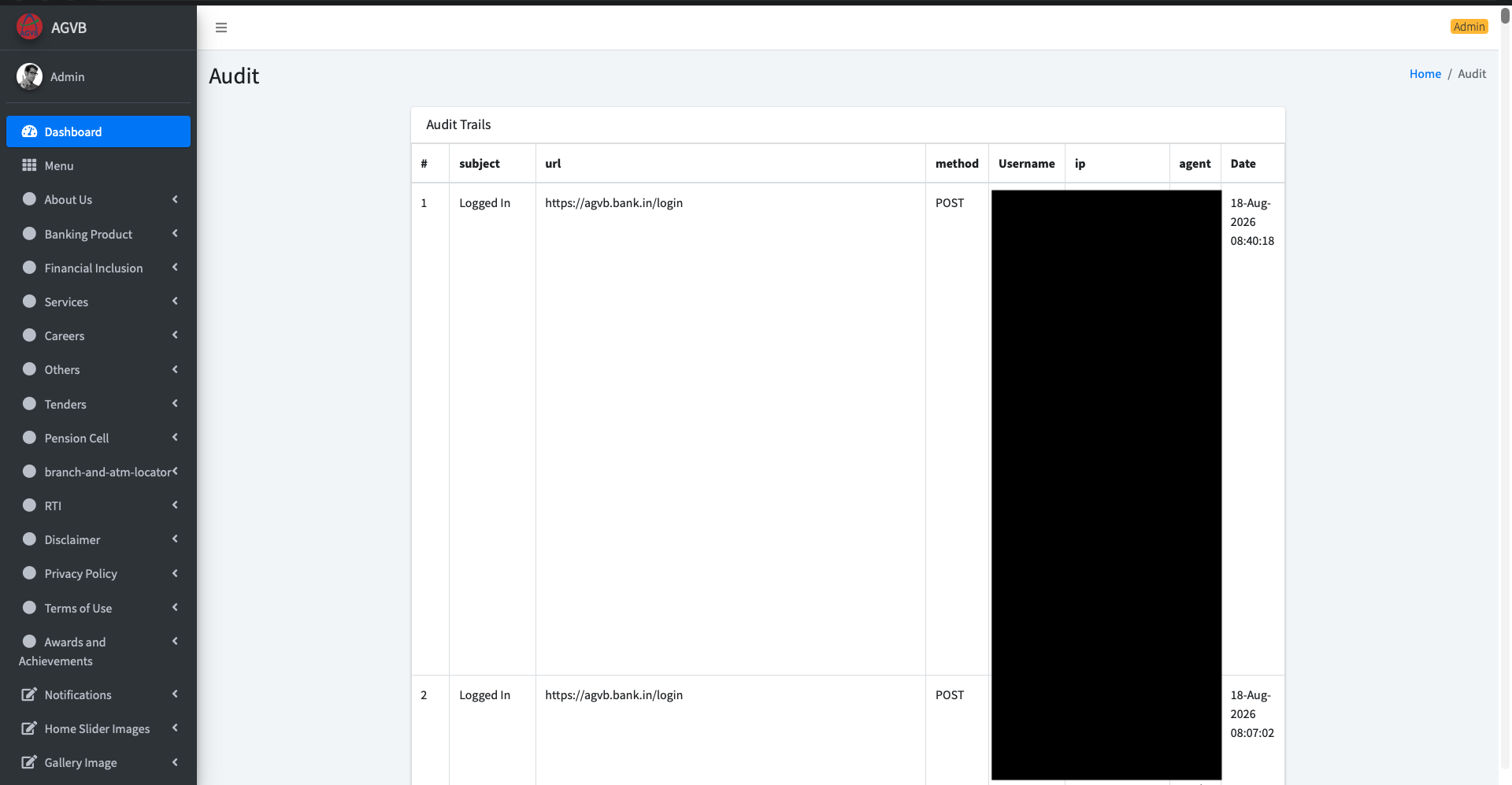
Figure 6. The app's built-in "Audit Trails," listing Logged In events as POST requests to https://agvb.bank.in/login, with the administrator's username, IP and user agent (masked) and timestamps on August 18. This is the application confirming, in its own logs, that real administrative logins were happening. The credentials captured in the debug store were a working administrator's, not a dead test account.
To be exact about what I did with that: I reused the credentials exposed in the stored request to authenticate to the administrative portal. I did not brute force anything, I did not bypass the login, I did not replay a cookie. The password was in a record the application had left readable, and it still worked. That is credential exposure leading to administrative access, stated plainly and no more dramatically than the facts allow.
And this is what was behind the door.
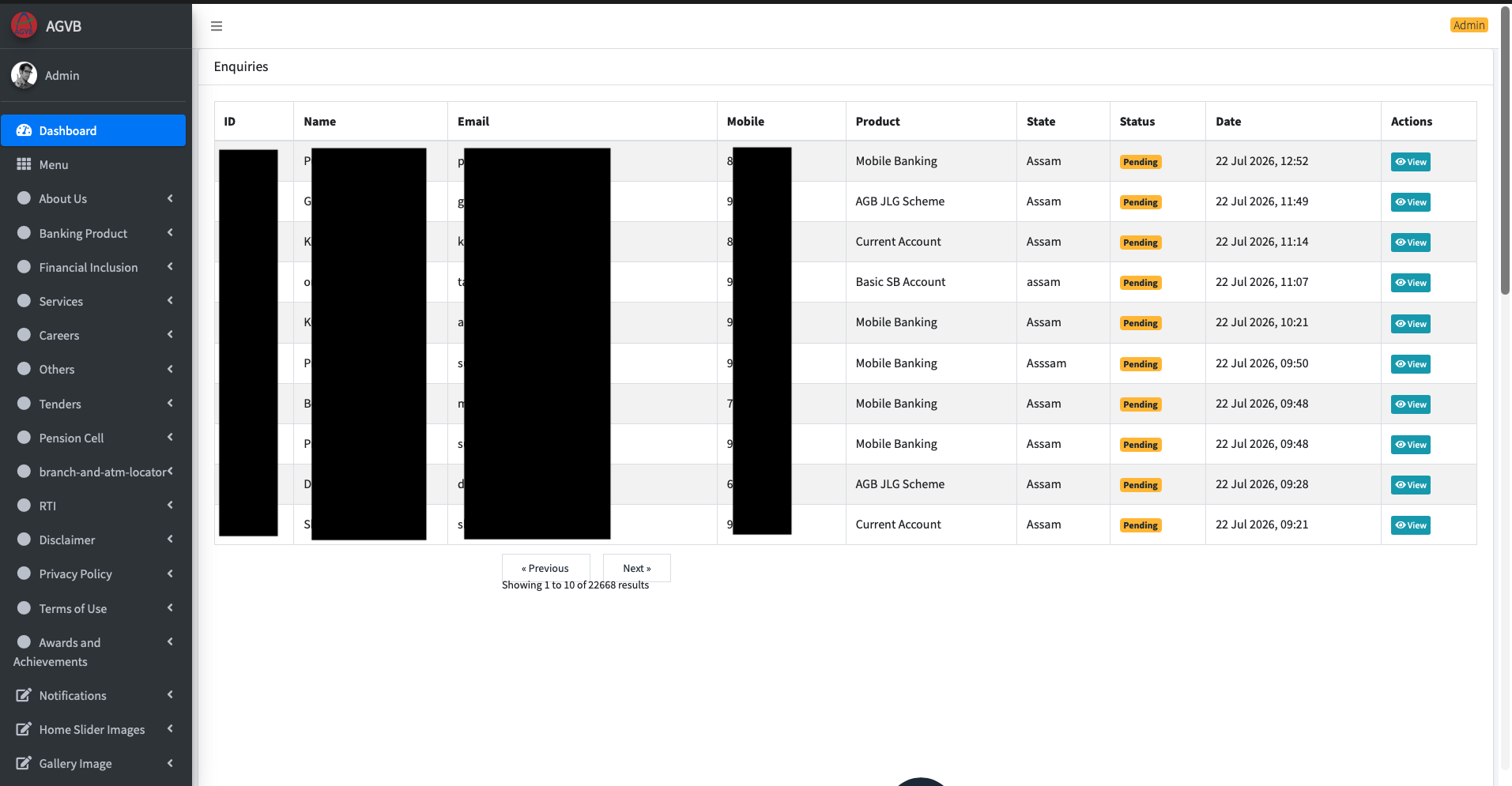
Figure 5. The administrative portal, logged in as Admin. The landing table is "Enquiries," customer submissions with name, email and mobile (all masked here). Look at the footer: "Showing 1 to 10 of 22668 results." Twenty-two thousand plus customer contact records, reachable from a session I got into with a password the site had written into a debug log.
It got more sensitive from there. The panel was a full content-management back end for the bank's site, and it governed real customer data.
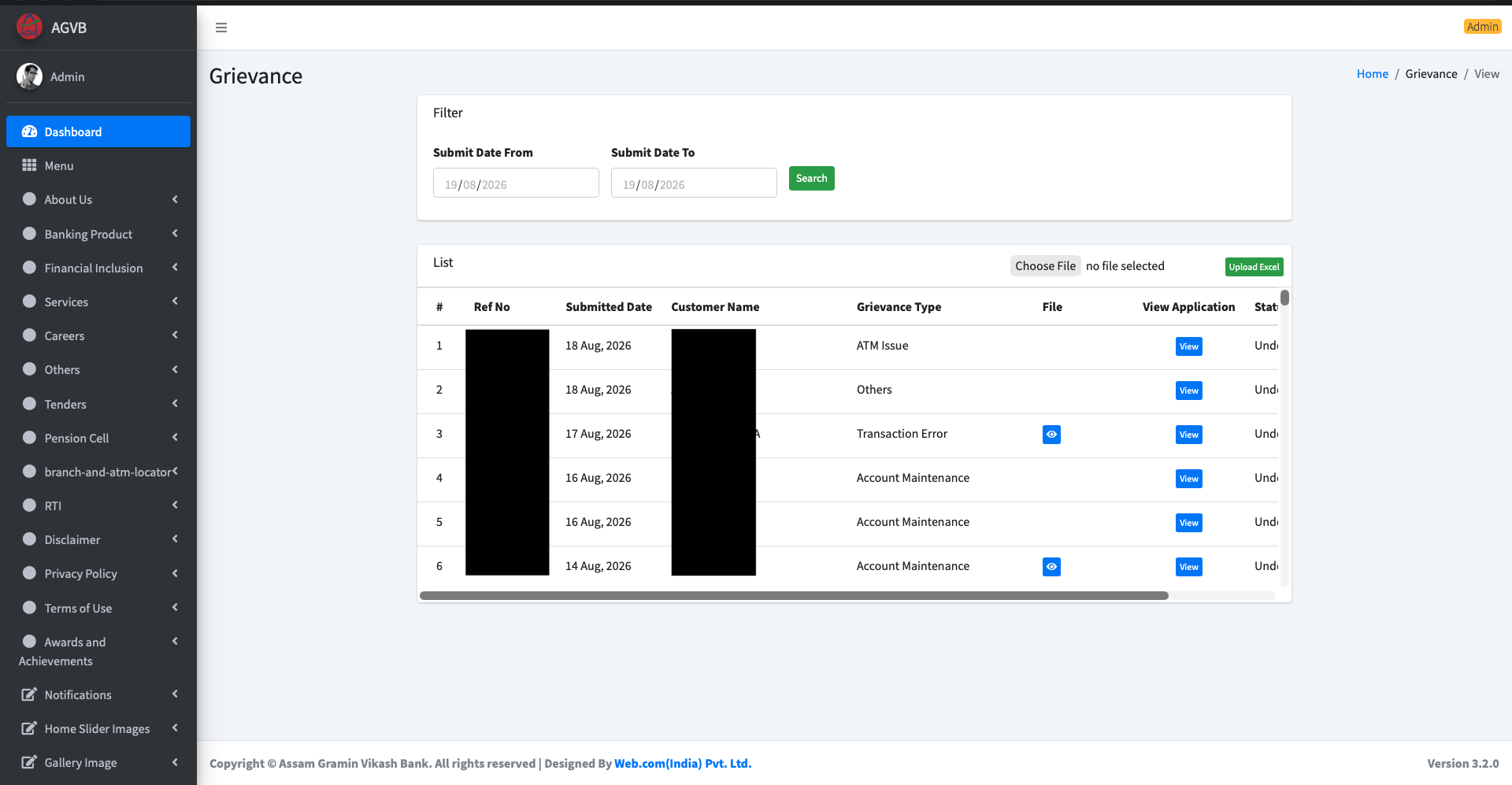
Figure 7. The "Grievance" module: customer complaints (ATM Issue, Transaction Error, Account Maintenance and so on) with reference numbers, customer names, and in some rows an attached file. There is a date filter and an Excel upload. The footer credits a third-party web vendor and an application version, which is a useful reminder that these regional bank portals are often built and operated by outside contractors.
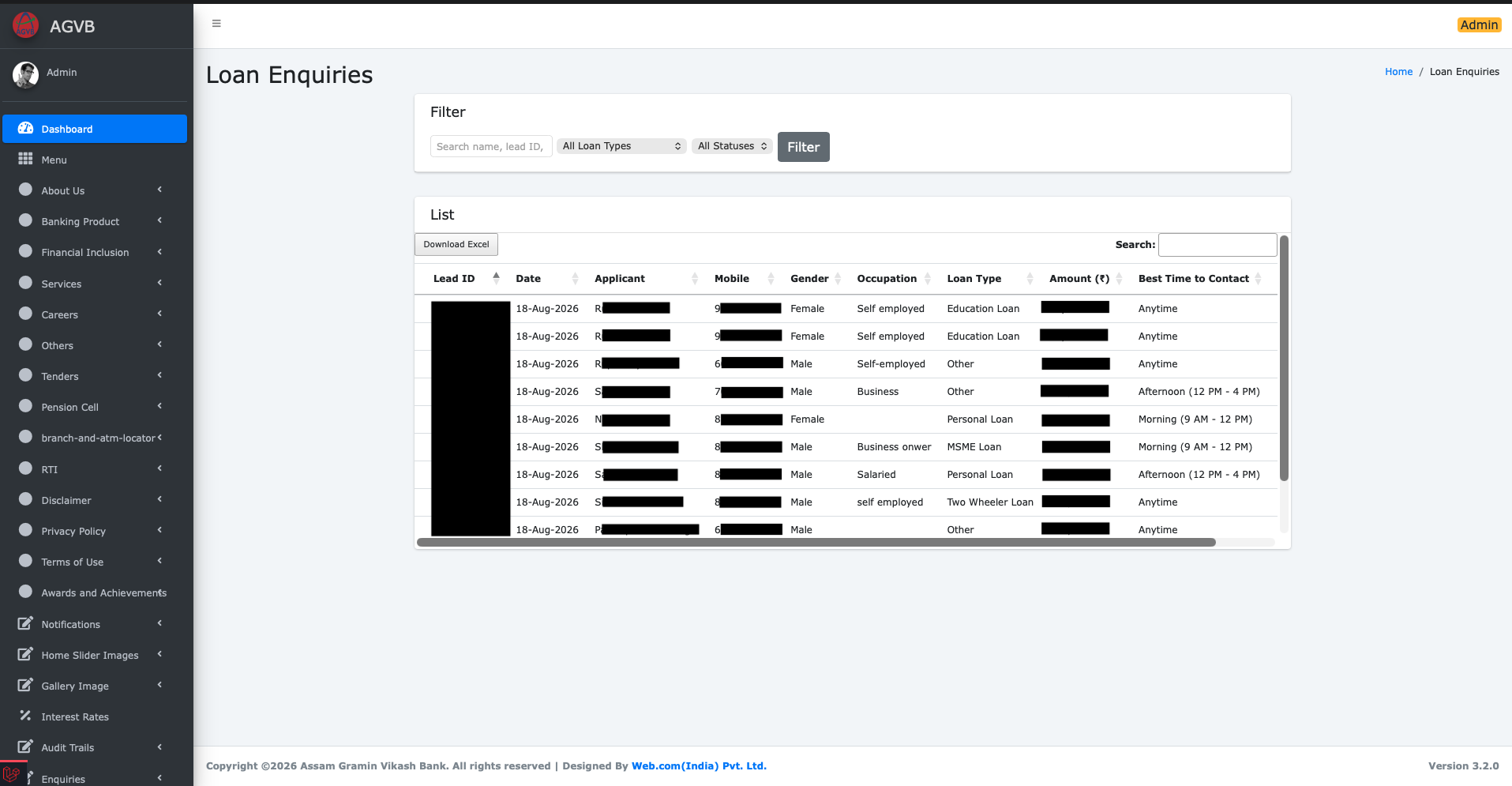
Figure 8. The one that made me want to close the laptop and start writing the disclosure email: "Loan Enquiries." Loan leads with applicant name, mobile, gender, occupation, loan type, the amount sought, and a "Download Excel" button that would export the lot in one click. I did not click it. This is where "interesting security bug" becomes "someone's financial life," and where the only correct next move is to stop looking and start reporting.
For the record: I did not download, export, or exfiltrate any customer data. I viewed enough to understand and evidence the severity, masked it, and moved to disclosure. The screenshots exist to prove the finding, not to hoard the data.
Responsible disclosure #
On the morning of August 19 I reported the issue to CERT-In, India's national computer emergency response team, with the technical detail and masked evidence.
The response was fast, and the fix was faster. By the time I went back to check, the debug tooling was no longer reachable the way it had been. Whatever the exact remediation on their end, the public exposure was closed.
CERT-In acknowledged the report.
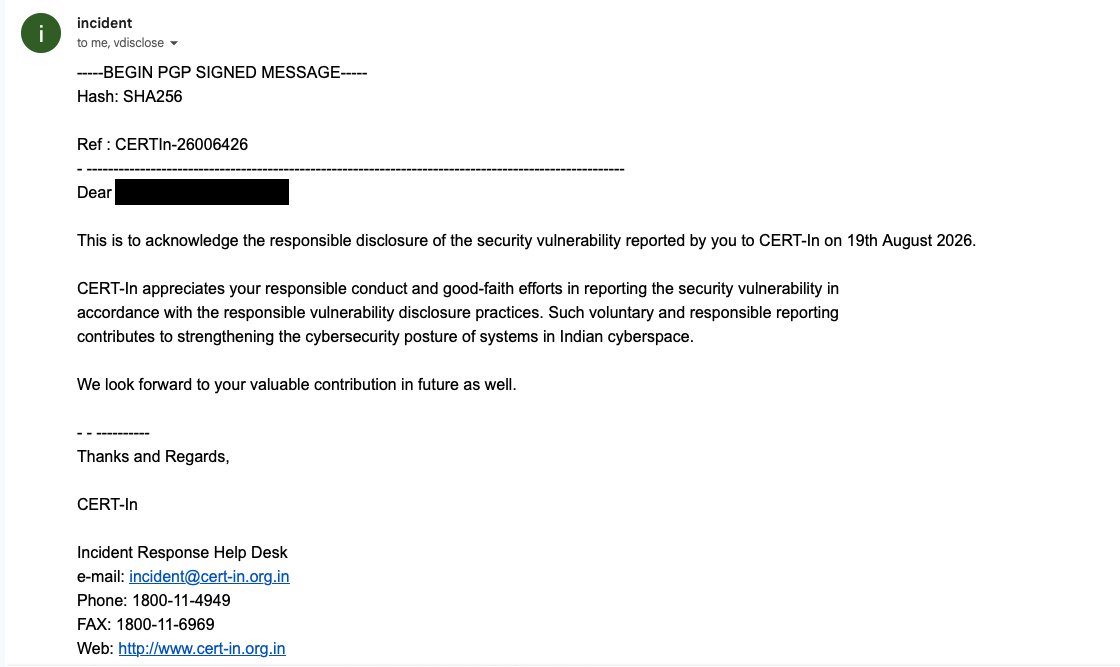
Figure 9. The acknowledgment from CERT-In's Incident Response Help Desk, reference CERTIn-26006426, PGP signed, dated to the report on 19th August 2026. It thanks the reporter for responsible, good faith disclosure.
I want to be clear about the tone here, because it is easy to get wrong. This is not a dunk on the bank. A regional rural bank running a vendor built portal is not unusual, and the failure mode here is one that has bitten far larger and far better resourced organisations. The system that deserves credit is the one that worked: a bug was found, it was reported through the right channel, the right channel moved quickly, and the hole got closed. That is the outcome you want.
What actually went wrong #
The reason I find this one worth writing up is that there was no single villain. There was a chain, and every link was individually forgivable.
Public Laravel application
        |
Debug tooling (Laravel Debugbar) left enabled in production
        |
Debug data persisted to storage (request history retained)
        |
The storage "Open" handler reachable via the admin entry point
        |
Stored request records include full bodies and headers
        |
A successful POST /login was among the stored records
        |
That record contained the admin username and password in the clear
        |
Administrative portal access using the exposed credentials
Read any one line and you can imagine a reasonable person shipping it. A debug tool on in a hurry. Storage left on because it was handy during development. An admin route that felt internal. Passwords in a request body, which is just how form logins work. None of these is a catastrophe.
Read them top to bottom and it is an administrative compromise of a bank's website.
That is the actual lesson, and it is worth saying without the drama: security is rarely lost in one big move. It leaks out through a series of small, defensible decisions that nobody stacked up and looked at together.
If you want the crisp version of the distinctions I was careful about:
- This was not remote code execution. I never ran code on the server.
- This was not SQL injection. I could read the SQL the app generated. I never executed my own.
- This was not a man in the middle. Nothing was intercepted on the network. The application recorded its own requests and the debug tool served them back.
- The captured cookies represent potential session compromise, not a demonstrated one.
- The admin access was credential reuse from an exposed record, not a login bypass and not, on the evidence, an "account hijack" in the theatrical sense.
In vulnerability terms, this sits at the intersection of a few well known classes: security misconfiguration, exposure of sensitive information (CWE-200), active debug code left in production (CWE-489), sensitive information written into logs (CWE-532), and insufficiently protected credentials (CWE-522), with a broken access control flavour around the debug endpoint. If someone made me put a number on it, I would call it high to critical: network reachable, no authentication or user interaction required, leading to full administrative access over sensitive data. But I would label that an estimate, not a verdict, because a real score depends on scope and impact details I am deliberately not detailing here.
Lessons for anyone shipping a Laravel app #
None of this is exotic. All of it is cheap to prevent.
- Keep development debug tooling out of production entirely. Debugbar's own docs and Laravel's deployment guidance both say this plainly: debug output belongs in development, not on a public site.
- Make sure production debug mode is off, and treat "is the debug bar reachable" as a thing your deploy pipeline actively checks, not a thing you hope someone remembered.
- If you use a debug tool that can persist request history, understand what that storage retains, and do not ship with it enabled. Retained request bodies mean retained passwords.
- Never let passwords land in logs, debug collectors, or request history. Scrub sensitive fields from anything that records request bodies.
- Put authentication and network restrictions in front of any debugging or diagnostic endpoint. "It felt internal" is not access control.
- Review admin routes and middleware so the front controller cannot render internal tooling to anonymous visitors.
- If credentials were ever exposed, rotate them immediately and invalidate existing sessions and tokens. Assume the worst about anything that sat in a readable log.
- Add an external attack surface review to your routine, especially if a third party built and runs the app. The people who deployed it are not always the people watching it.
Final thoughts #
I went in with a lazy assumption, that the .bank.in cleanup was already done, and the internet corrected me inside an hour. What actually got me was not a flaw in Laravel, or in PHP, or in Docker. Those all did exactly what they were told. What got me was a development convenience left switched on in a place it was never meant to be, remembering things it was never meant to keep, in front of a door it was never meant to open.
The panel was doing its job perfectly. It remembered a login. It just remembered it for the wrong person.
Reported to CERT-In. Fixed quickly. Ref CERTIn-26006426.
If you found this interesting, or you think I got a technical detail wrong, I would genuinely like to hear it. Discord or email.